Sunday, January 4, 2015

Aplikasi android untuk blogger dan tumblr

Okay for numerous post, saya rasa gaperlu lah selalu ada introduction mengenai apa yang akan kita bahas. So it is about android apps.
Sejauh ini searching and browsing belum menemukan android apps untuk blogging blogger dan tumblr sekaligus. Yang ada ya hanya aplikasi per blog nya. Tapi kalau mencari android apps untuk Blogger dan Wordpress, aplikasi androidnya sudah ada.
Hanya saja kemarin kemarin lagi error dr servernya.
Namanya Soffice
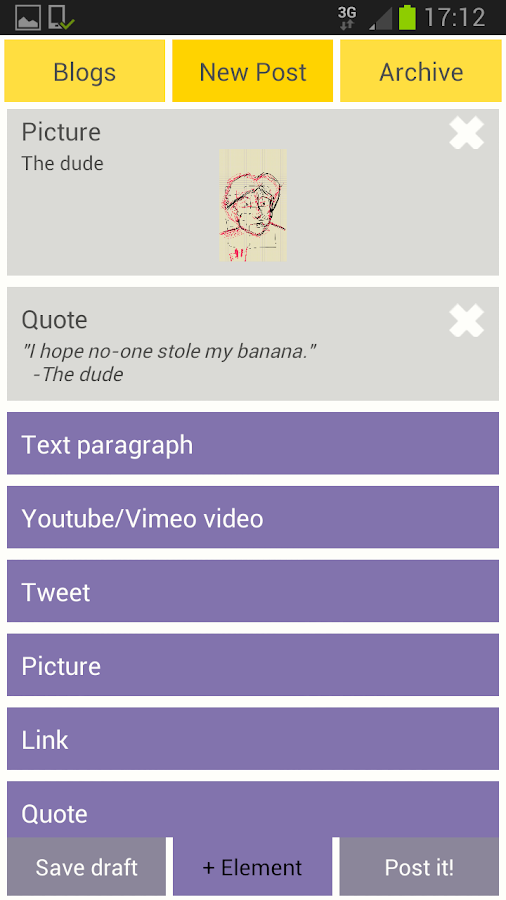
soffice memungkinkan user untuk posting secara bersamaan pada eaktu real time ke dua buah blig sekaligus. Blogger dan Wordpress.
Soffice dapat di download langsung secara gratis melalui play store di handphone anda.
Saya sudah mencoba, dan benar benar berhasil. Tapi sayangnya sekarang lagi error.
Waktu itu lagi error karena host imagenya. Sama sekali tidak dapat upload gambar baik ukuran kecil maupun besar (padahal sbelumnya berhasil)
So the conclusion is, untuk tumblr sendiri, kita dapat blogging menggunakan aplikasi blogging tumblr. Dan blogger untuk blogger

Labels: , , , , , ,

Wednesday, May 28, 2014

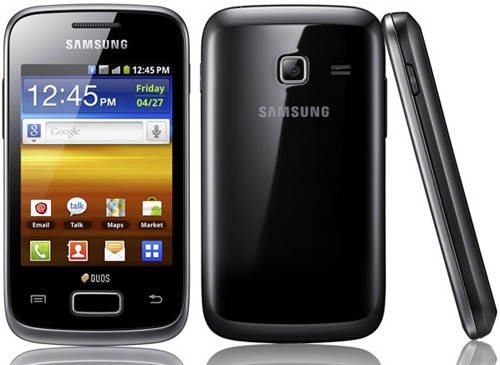
How to flash Samsung Galaxy Y Duos GT S6102

My Phone is  Samsung Galaxy Y Duos GT S6102

I was "installed" my phone to several ROM, the last ROM I used is TechnoDuos, Once my Phone is going error and lagging so bad.

So then I have to install Stock Firmware again, and here's How to flash Samsung Galaxy Y Duos GT S6102 to it's Stock Firmware,

Necessary Downloads and Tools :
After download those file, follow this step :

Your Phone :1. Make sure the battery of the device is charged more than 80 percent.
2. Make a backup of all your important data before following the guide.
3. The Galaxy Y duos should be factory unlocked and not locked to any particular carrier.

Your PC:
1. Install USB Drivers for Samsung Galaxy Y Duos on your computer. (Or samsung kies)
2. Enable USB Debugging Mode on the device by navigating to Settings >> Developer 
Options.
How To :
1. First extract the downloaded files on your desktop.
2. Now Reboot your device into Download Mode:
- Turn Off your phone.
- Press and Hold the Volume Down+Home+Power keys all together at the same time for a few seconds.
- Once you see the warning message, then just hit the Volume Up key and you’re done.

3. Next, Run the Odin application on your PC. I use Odin V3.07 by Manoranjan
4. While in Download Mode, Connect your Galaxy y duos to PC via the USB Cable and make sure you've successfully installed USB Drivers for your phone on PC.
5.Check that Odin has recognized your device. and the ID:COM port will either turn blue or yellow and you should also see an Added!! in the message section.
6. Also chek that the ‘Auto Reboot‘ and ‘F. Rest Time‘ and rest leave the default Odin settings.
7.Click on the PDA button and browse the Firmware update file.(if available)
8. Similar to that select Phone (modem) ,CSC .
And wait, if your Samsung Kies windows is still opened, Closed it. If You don't close it, com port in your Odin wont be detected.
9.After selecting the correct file (tar.md5) then hit START button and wait.
10. Finally you need to wait for Odin to completely flash the update file. As it completes, Odin will notify you via the PASS!! Message and your Galaxy y duos should automatically reboot.
11. If it does not reboot automatically reboot then go to recovery (vol. up+power+home)  mode and clear cache and wipe data. (this will usually happen)
12. If your phone again and again repeating samsung logo on it's screen, unplug the battery of your phone, and put it again, then restart. Congrats, your phone has finally on it's stock firmware again. Cheers ~!
That's it you have successfully flashed your samsung galaxy y duos.

Thankyou for TricksDroid

Labels: , ,